Plans & Billing
Where to see your account's plan and usage, how plan limits and add-ons show up in FormAssembly, and how to upgrade or talk to sales.
Where do I find my plan and usage?
FormAssembly shows your account's plan and usage on the Billing page. Open it from Billing in the account navigation, alongside Profile, Security, Team and the other account pages.
The Billing page is available to account administrators — the people in your account who hold the billing permission. Everyone else in the account sees the same plan and the same entitlements in practice, because plans apply to the whole account rather than to individual users, but only administrators can open the Billing page itself.
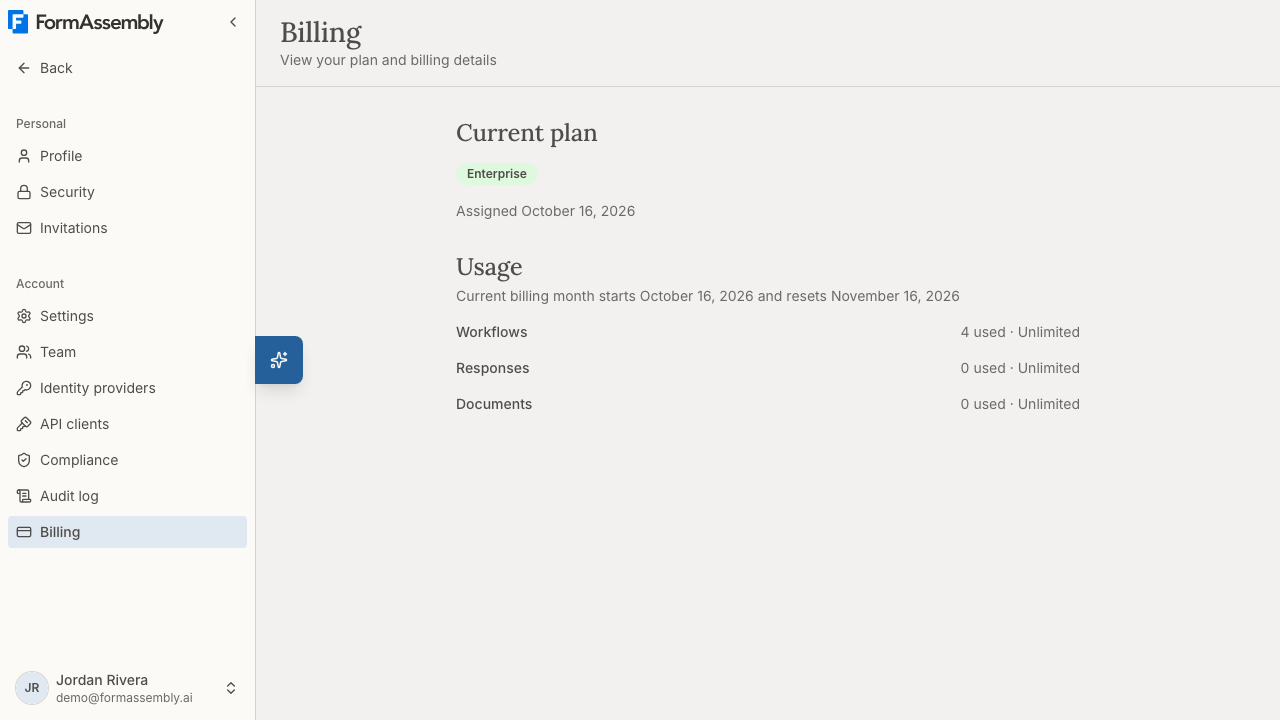
Current plan
The Current plan section names the plan your account is on. FormAssembly has three plans, from lowest to highest: the Collect plan, the Automate plan, and the Enterprise plan. Your plan is shown as a tier badge, so a quick glance at the Billing page tells you which plan the account is running on.
Beneath the badge, FormAssembly shows Assigned followed by a date — the date your account was put on that plan.
Plans apply to the entire account. Every user in the account shares the same plan, the same features and the same usage allowance — there is no way to give one user a different plan from their colleagues.
New sign-ups start on the Collect plan.
Usage
The Usage section shows how much your account has consumed across the dimensions FormAssembly tracks, such as workflows, form responses and generated documents. Each dimension appears as a read-only meter.
The section opens with a line reading "Current billing month starts" and "resets", followed by the two dates. Form responses and generated documents are counted per billing month and reset to zero on the reset date, so those meters report the current month only rather than the lifetime total. Workflows are a count of what exists right now, not a monthly total, so the workflow meter does not reset.
The generated documents meter appears only when your account can use document generation, so not every account sees it.
All plans are currently unlimited. The Collect plan, the Automate plan and the Enterprise plan all run with no ceiling on workflows, responses or generated documents, so a usage meter shows consumption without a limit next to it. Use the Usage section to understand how much your team is collecting, not to check how close you are to running out.
Whatever your usage, live data collection is never blocked. Published forms keep accepting and recording responses regardless of what the usage meters say. FormAssembly treats live data collection as something that must never be interrupted.
What the Billing page can and cannot do
The Billing page is read-only. It is a view of your plan and your usage, not a place to transact.
You can:
- See which plan the account is on.
- See current usage against each tracked dimension.
You cannot, from inside FormAssembly:
- Change or upgrade your plan.
- Add or remove an add-on.
- Enter or update payment details.
- View or download invoices or billing history.
All of those go through the FormAssembly sales team. Invoice history and self-service plan changes are planned for a future release and are not available in the product today.
Why is a feature locked?
FormAssembly never hides a feature because of your plan. Every feature stays visible in the interface no matter which plan you are on. When you try to use a feature that your plan does not include, FormAssembly opens an upgrade prompt that names the plan you need — for example, a prompt telling you to upgrade to the Automate plan to use that feature.
This is deliberate: seeing the feature and a clear prompt is more useful than an empty space or an unexplained error, because it tells you exactly what to ask for.
Upgrade prompts list every plan the feature is available on, so you can see whether the next plan up is enough or whether the feature belongs to the Enterprise plan.
Workflow step types follow the same rule. Document generation is available on every plan. E-signature is a plan feature like any other: on a plan that does not include it, choosing E-Signature in the Add step menu in Focus view opens the upgrade prompt.
Connector add-ons
Some connectors are add-ons, bought separately from your plan. The add-on connectors are:
- Salesforce
- Webhook / HTTP
- Dynamics 365
- Dropbox
- Box
- The payment connectors — Stripe and PayPal, sold together as a single add-on.
Accounts that were already using Dynamics 365, Dropbox or Box in a workflow when those connectors became add-ons were granted them automatically, so those workflows keep working.
An add-on is not part of the plan ladder. Moving to a higher plan does not automatically grant an add-on, and a lower plan can hold an add-on that a higher plan does not include. Because of that, trying to use an add-on connector your account has not purchased opens a dialog that explains the connector is available as an add-on rather than part of your plan, with Not now and Talk to sales actions. The dialog does not mention plans or upgrades, because no plan change is guaranteed to unlock it.
If you ask Fai, the FormAssembly AI assistant, to build a step using a connector your account has not purchased, Fai tells you it is an add-on your account team can enable instead of attempting the configuration.
How do I upgrade or buy an add-on?
Plan changes and add-on purchases go through FormAssembly's sales team.
- Open the upgrade prompt or add-on dialog that appeared when you tried to use the feature, and choose Talk to sales. You can reach the same page directly when you are not in the middle of a task.
- On the Talk to sales page, read the What you get section, which summarises what unlocking the full platform includes.
- Email the sales contact listed on the page — [sales@formassembly.com](mailto:sales@formassembly.com) — describing the plan or add-on you need. Mentioning the feature that was blocked and the plan the prompt named helps the sales team quote the right thing the first time.
FormAssembly applies the change to your account once it is agreed. There is no self-service checkout and no in-app purchase flow.
When do plan changes take effect?
- Upgrades take effect immediately. As soon as your account is moved to a higher plan, the newly included features are usable — no sign-out, no waiting period.
- Downgrades and cancellations take effect at the end of the current billing cycle, monthly or annual, never immediately. Your account keeps its current plan and full access until that cycle ends, at which point the new plan (or the cancellation) activates.
Losing access to a feature never deletes your data. A downgrade restricts what you can use; it does not remove workflows, responses, themes, connections or any other content you have created. If you later upgrade again, the restricted features become usable once more.
Tips & Troubleshooting
- I can't find the Billing page. The Billing page requires the billing permission. If Billing does not appear in your account navigation, ask another administrator in your account to open it, or to grant you the permission from Team.
- A teammate sees a feature locked and I don't. That is not a plan difference — plans are account-wide. The difference is role permissions. Check the member's role under Team.
- My usage meter has no limit next to it. That is expected. Every plan is currently unlimited on workflows, responses and generated documents, so the meter reports consumption only.
- My response count went back to zero. Responses and generated documents are counted per billing month. Check the reset date shown at the top of the Usage section — the count restarts on that date each month.
- I don't see a generated documents meter. The documents meter appears only when your account can use document generation.
- An e-signature step is locked. E-signature is included on some plans and not others. On a plan without it, choosing E-Signature from the Add step menu opens the upgrade prompt naming the plans that include it. Document generation is different: it is available on every plan today.
- An upgrade prompt names a plan I'm already on. Confirm the plan badge in Current plan on the Billing page. If the badge and the prompt genuinely disagree, email [sales@formassembly.com](mailto:sales@formassembly.com) with a screenshot of both so the account record can be corrected.
- I need an invoice or a receipt. Invoices are not available in the product. Request them from the sales contact on the Talk to sales page.
- I bought an add-on but the connector is still blocked. Add-on grants are applied to your account by FormAssembly. Reload the page first; if the connector still shows the add-on dialog, reply on your existing sales thread so the grant can be checked.
Was this article helpful?